Project 04Design System
← All workMyLab Design System
Turning a growing CRM into a shared product language.
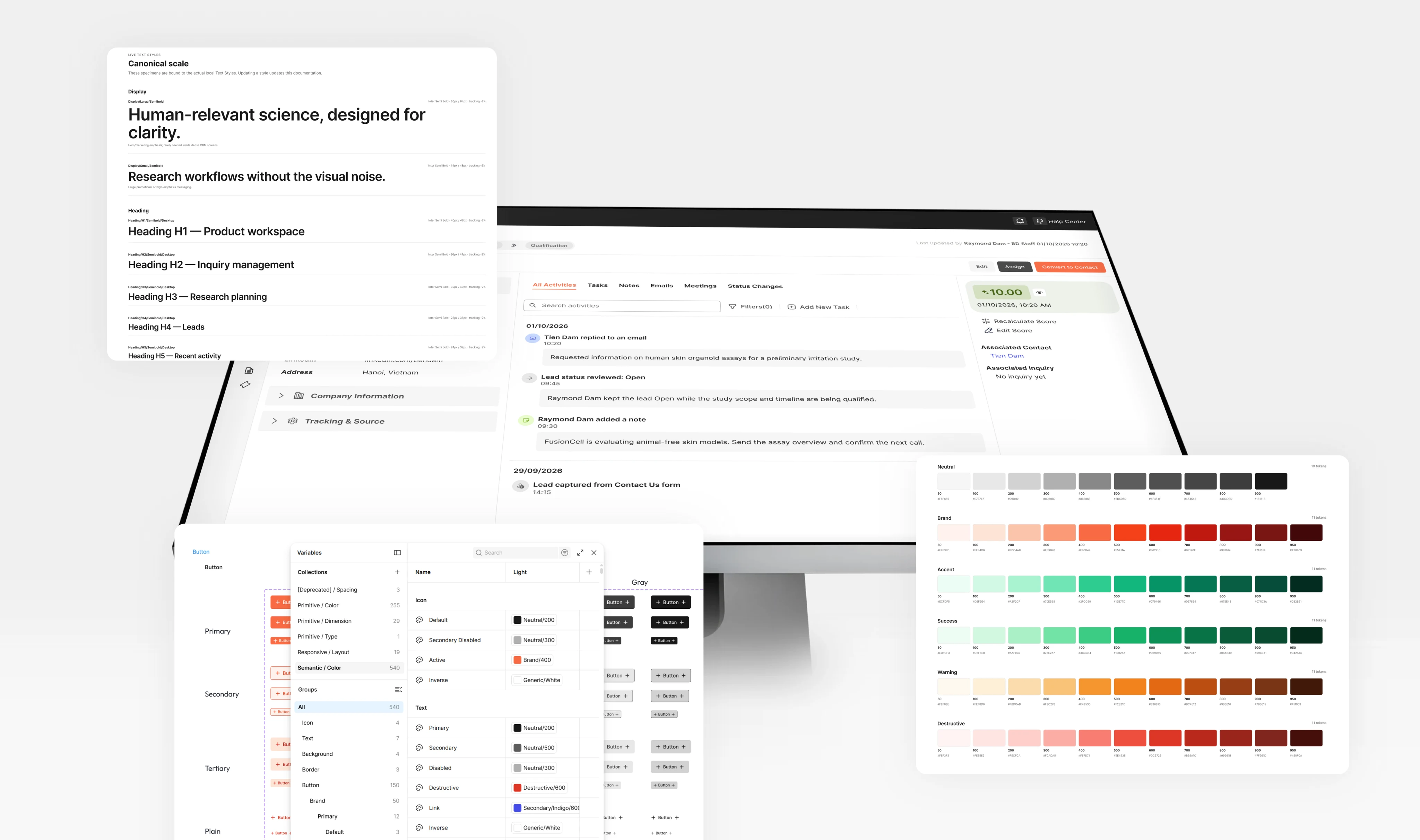
MyLab is a multi-role B2B CRM for biotech business development, connecting BD teams, clients, researchers and solution providers across Leads, Inquiries, Communication, Tasks, Members and Projects. As it expanded, recurring UI decisions were being solved independently across modules.
I designed a system of foundations, semantic tokens, reusable components and product patterns so teams could reuse established decisions while keeping each workflow flexible.
- Role
- Senior product designer
- Year
- 2024
- Scope
- Design system architecture · Token strategy · Components · Product patterns · Documentation
- Platform
- B2B SaaS · Enterprise CRM
01The challenge
Consistency was becoming a product problem
At first, MyLab simply needed a more consistent UI library. But as more modules and roles were introduced, the problem became larger.
The product needed to support
- Multiple workflows
- Different user roles and permissions
- Dense CRM data
- Statuses and lifecycle progression
- Continuous expansion
The same interface patterns appeared repeatedly, but they were often solved inside individual screens. Search, filters, tables and status patterns all looked similar - but the underlying decisions weren't always shared.
- The symptom
- Duplicated components
- The deeper problem
- Duplicated product decisions
The question
What should the system standardise, and what should remain specific to each product workflow?
02From UI kit to infrastructure
Components alone weren't enough
A component library can answer what a Select looks like. It doesn't answer the product decisions around it:
- How should filtering work?
- Where do bulk actions belong?
- How should activity history behave?
- How should users move from a listing into a detail page?
So I stopped treating the design system as a library of reusable UI and structured it as layers of reusable decisions. Each level solves a different type of problem.
Foundation
Colour · Typography · Spacing · Grid · Radius
Token
Primitive values · Semantic meaning · Modes
Core component
Button · Input · Select · Modal
Product component
Data table · Activity item · Phase indicator
Pattern
Listing · Filtering · Detail · Forms
Product
Leads · Inquiries · Members · Projects
Core principle
The closer something gets to the product, the more context-specific it can become.
Goals
The goal wasn't maximum component reuse. It was enough shared structure that designers could spend their time on the domain-specific problem.
Create a shared product language
Common interactions behave predictably across modules.
Encode meaning, not just appearance
Tokens describe product intent rather than individual hex values.
Preserve contextual flexibility
Constrain repeated decisions without forcing every workflow into one layout.
Bridge design and implementation
Component structure reads the same to designers and engineers.
North star
A designer should move from a product problem to a consistent solution without re-deciding foundations, component behaviour or established interaction patterns.
03System architecture
Organise by level of reuse, not by module or role
MyLab has both multiple modules and multiple user roles. It would have been easy to organise the system around either. But roles and modules are consumers of the system - not system boundaries.
By role
- BD / Button
- Client / Button
- Provider / Button
By module
- Lead / Table
- Inquiry / Table
- Member / Table
So I structured the library around abstraction instead
System
- Foundations
- Tokens & Variables
- Core Components
- Product Components
- Patterns
- Templates
- Documentation
- QA / Playground
- Deprecated
Product
- Lead
- Inquiry
- Member
- Project
Role and permission logic stays in the product. Reusable visual and interaction logic stays in the system. This gives every new solution a clearer home.
| Example | System level |
|---|---|
| Button | Core component |
| Activity item | Product component |
| CRM listing | Pattern |
| Lead listing | Product design |
- Before
- New moduleDesign everything it needs2 steps
- After
- New moduleReuse established system decisionsDesign only what's specific to the domain3 steps
Design principle
Organise the system by level of reuse, not by the screens consuming it.
More specific
- 06
Templates
Whole page layouts
- Listing page
- Detail page
- 05
Patterns
How a repeated problem behaves
- CRM listing
- Search & filters
- Bulk actions
- Saved views
- 04
Product Components
CRM-specific, shared across modules
- Activity item
- Status badge
- Record header
- 03
Core Components
Domain-free building blocks
- Button
- Input
- Select
- Table
- 02
Tokens & Variables
Named decisions, by role
- Colour roles
- Button variables
- Spacing
- 01
Foundations
The raw scales
- Colour ramps
- Type scale
- Grid
More reusable
Documentation
Usage at every level
QA / Playground
Tested before release
Deprecated
Held apart until nothing uses it
Product
- Lead
- Inquiry
- Member
- Project
Domain content, roles and permissions stay here.
04Three core decisions
Standardise decisions, not screens
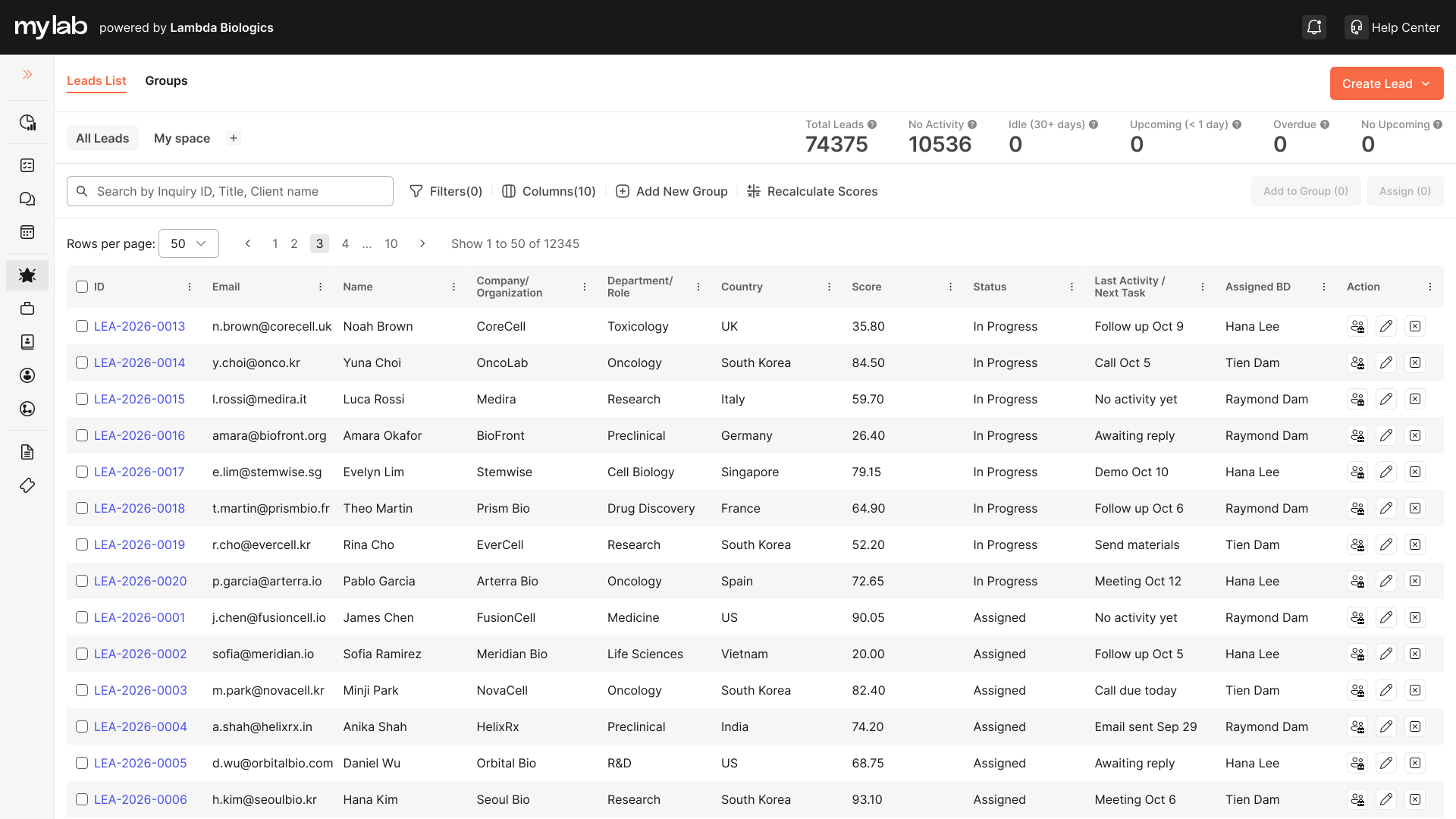
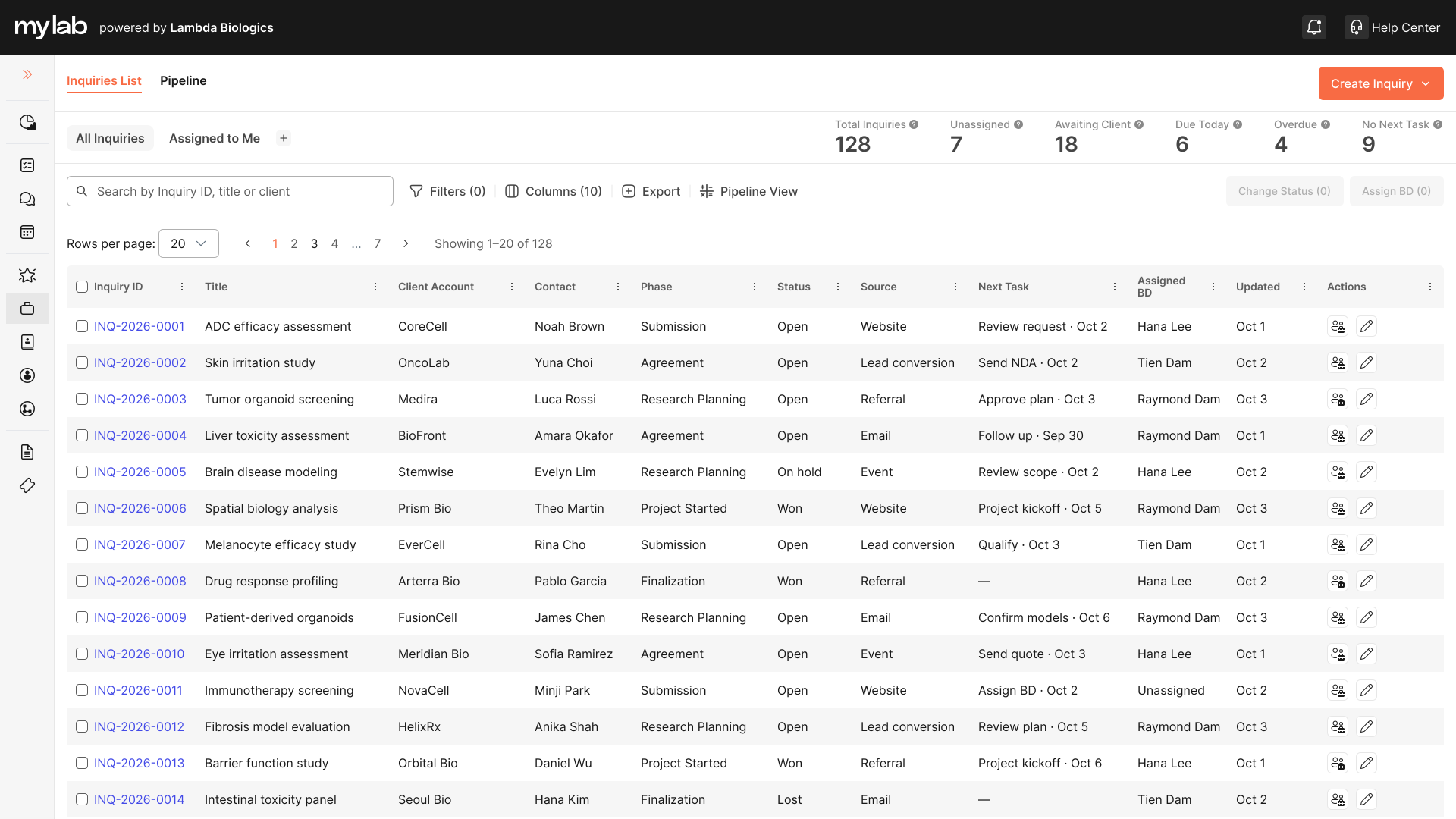
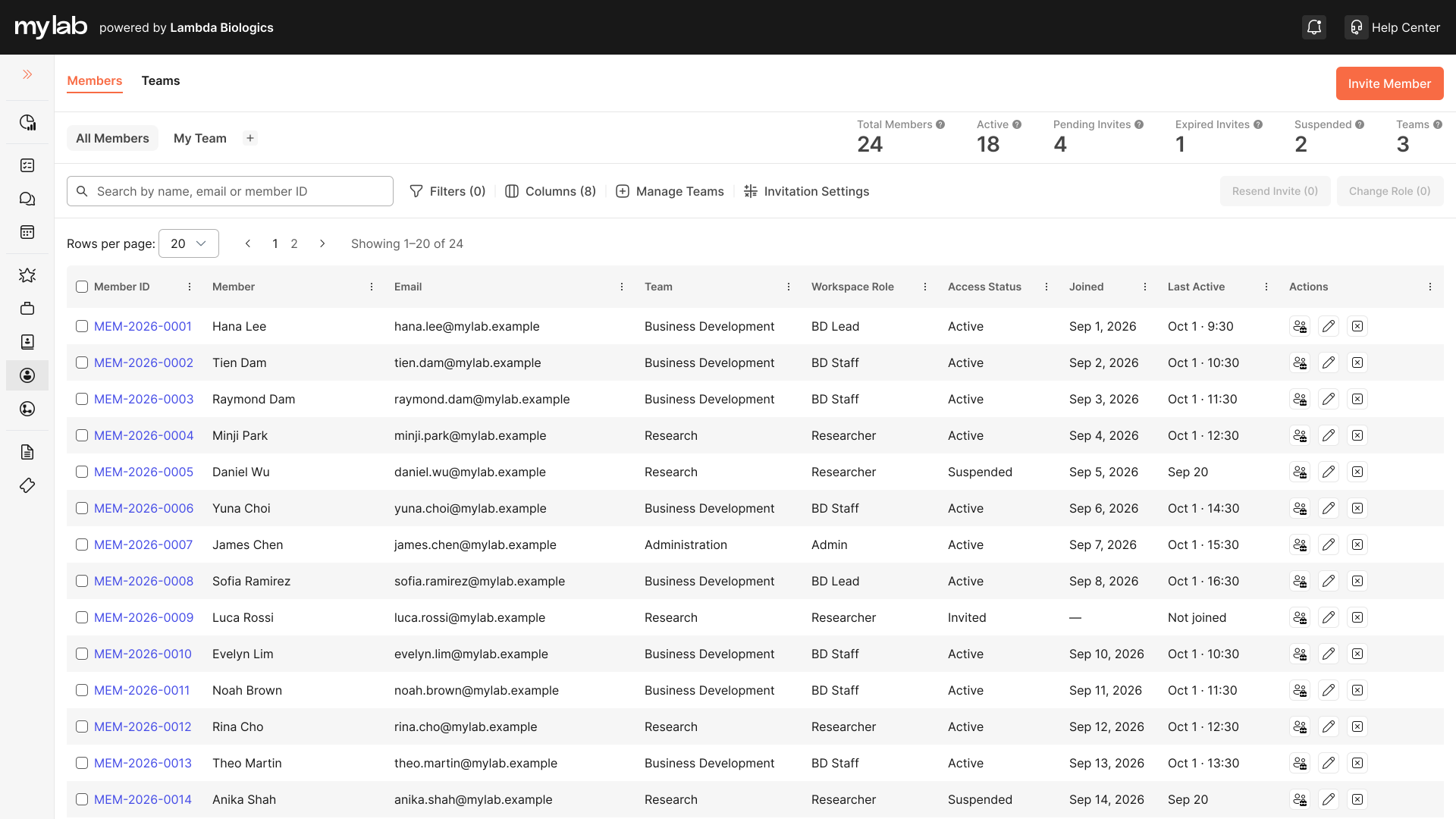
Lead, Inquiry and Member listings contain different information. But many interaction decisions are the same.
Copying the entire Lead screen into another module would create unnecessary coupling. Instead, I separated what repeats - the listing pattern - from what changes - the domain content. The system defines how the experience behaves; the product defines what information belongs inside it.
What repeats
- Search
- Filters
- Saved views
- Selection
- Bulk actions
- Pagination
- Empty states
- CRM Listing Pattern
- Lead Listing
- Inquiry Listing
- Member Listing
Design principle
Reuse structure where the user problem repeats - not merely where screens look similar.
Encode meaning, not colour values
A raw colour tells the system what something looks like. It doesn't explain why the value is being used. Orange could mean brand, primary action, active navigation, selected state or highlight - and connecting a component directly to that raw value creates tight dependencies. So I introduced a semantic layer.
- Instead of
- brand/orange/800Button2 steps
- Use
- brand/orange/800action/primary/backgroundButton3 steps
The component consumes meaning, not a particular colour - so the visual implementation can change without redefining what the interface means.
Primitive
Raw values - e.g. neutral/900
Semantic
Product intent - e.g. text/primary
Component
Implementation - e.g. Heading / Label / Table cell
Modes stay independent
Instead of combined modes
- Light + Comfortable
- Light + Compact
- Dark + Comfortable
- Dark + Compact
Two independent dimensions
- Theme
- Density
This avoids multiplying modes as the system grows.
Design principle
Components should consume meaning, not raw visual values.
- Brand/400→ Button/Brand/Primary/Default/Background
- Generic/White→ Button/Brand/Primary/Default/Textvia Text/Inverse
- Generic/White→ Background/BG-Default
- Neutral/900→ Typography/Primary
Reuse behaviour through patterns
The product repeatedly asked questions larger than any individual component could solve: what belongs in a CRM listing, how filters combine, what happens when no results exist, where bulk actions appear, what belongs in an entity header, how activity history behaves. So I added Patterns above the component layer.
CRM Listing Pattern
- Search
- Filters
- Saved / focused views
- Data table
- Selection
- Bulk actions
- Pagination
- Empty / no-result states
Detail Pattern
- Entity header
- Primary information
- Status
- Actions
- Activity
- Related information
Components
Construct the interface
Patterns
Define recurring behaviour
Modules
Supply domain-specific content
- Before
- Same componentsDifferent interaction decisions in every module2 steps
- After
- Same componentsShared interaction modelContext-specific product content3 steps
Design principle
Reuse components for construction. Reuse patterns for behaviour.
05Quality
The default state isn't the finished component
MyLab contains forms, tables, communication, permissions and asynchronous system feedback. So component definition includes more than how something looks in its ideal state.
Interaction
- Default
- Hover
- Focus
- Pressed
- Disabled
- Loading
Data
- Empty
- No results
- Error
- Unavailable
- No permission
Lifecycle
- Draft
- Stable
- Deprecated
Accessibility handled at the system level
- Semantic colour
- Contrast
- Focus treatment
- Touch / click targets
- Readable hierarchy
- Consistent feedback
This makes quality part of the reusable solution instead of something added to individual screens later.
Live · Primary
Default
- Button/Brand/Primary/Default/Background#F86B44
- Button/Brand/Primary/Default/Text#FFFFFF
Figma variant Color=Brand, Size=L, Type=Primary, State=Default
| Default | Hover | Focus | Pressed | Disabled | Loading | |
|---|---|---|---|---|---|---|
| Primary | ||||||
| Secondary | ||||||
| Tertiary | ||||||
| Plain |
06Growing with the product
Product needs should drive the system
I didn't try to predict every possible component MyLab might eventually need. Instead, I defined a growth rule.
New product requirement
Solve it in context
Validate the solution
Does this problem repeat?
If yes, it becomes a system candidate
Token, component, product component or pattern
Reusable solution returns to the product
This avoids two common design-system problems
Too little systemisation
- Every team solves the same decisions again
Too much systemisation
- The library tries to anticipate every future scenario and becomes rigid or bloated
The design system grows from validated product needs. Not ahead of them.
07Outcome
Shared decisions became product infrastructure
The most important result wasn't a larger component library. It was a clearer relationship between product decisions.
Before
After
- 01
Before: Each module owns its UI decisions
After: The system owns shared decisions
- 02
Before: Components consume raw visual values
After: Components consume semantic meaning
- 03
Before: Variants manually created for every combination
After: Predictable properties and contracts
- 04
Before: Interaction behaviour re-decided screen by screen
After: Patterns define recurring behaviour
- 05
Before: Every module solves the complete UX problem
After: Modules focus on what is genuinely domain-specific
- Cell
- Row
- Data table
- CRM listing
- Leads / Inquiries / Members
The system becomes infrastructure between product thinking and product execution.
08Reflection
The hardest part was deciding what should become reusable
Building a component wasn't usually the difficult decision. The harder questions changed the work from building a UI kit into designing product infrastructure.
- Is this a component or a product pattern?
- Should the system constrain this behaviour, or should it remain flexible?
- Does this belong to MyLab or only to one module?
Takeaway
A design system should standardise repeated decisions - not repeated pixels.
More work
- 01CDG OneFMS - Movement OrderFleet Management Handover WorkflowEnterprise Web2023
- 05Lambda BiologicsA brand identity for an organoid biotech, grown from one continuous movement and published as the online guideline its teams build from.Branding2026
- 06XIANGQI - The Living BattlefieldSculptural Xiangqi BoardIndustrial Design2025