Project 01Enterprise Web
← All workCDG OneFMS - Movement Order
Designing a vehicle handover workflow that adapts when real operations don't follow the plan.
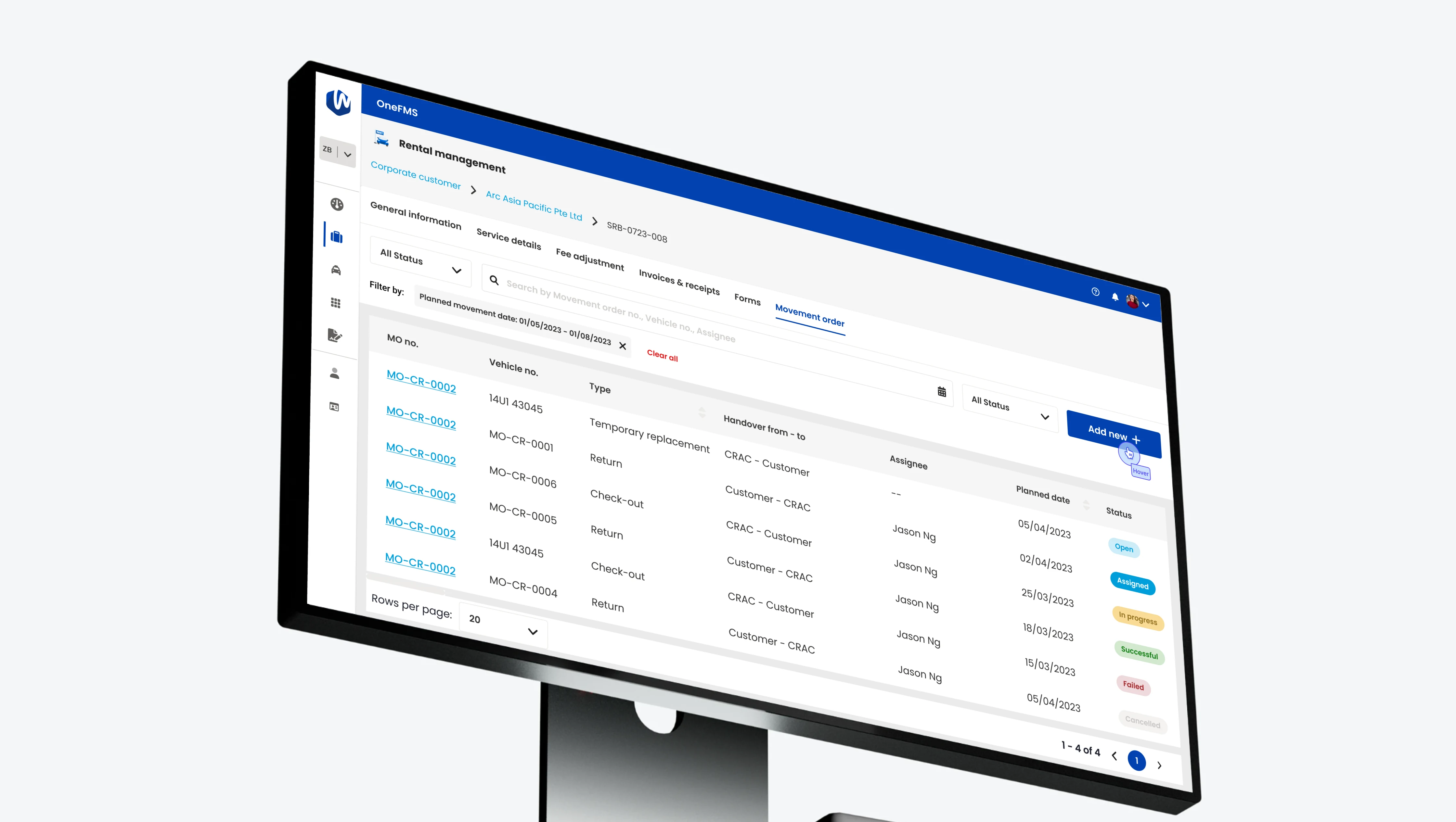
CDG OneFMS is an enterprise fleet-management platform. Movement Order handles one specific part of it: moving a vehicle from one handover point to another. It looked simple at first - Vehicle A to Location B - until real operations brought booking context, vehicle assignment, one-time delivery addresses, accessories and documents, and planned versus actual handover.
I redesigned the workflow so standard cases remain simple while operational exceptions remain fully supported.
- Role
- Senior UX/UI designer
- Year
- 2023
- Scope
- UX analysis · Workflow design · Information architecture · UX/UI · Prototyping
- Platform
- Enterprise fleet management · Web
- Context
- Product work on CDG's OneFMS fleet-management platform. Customer and staff details in the screens are fictional
01The challenge
A vehicle movement isn't just From → To
A Movement Order doesn't exist independently. It begins inside an existing operational context.
- Corporate Customer
- Service Booking
- Movement Order
- Execution
- Complete / Cancel
What the system already knows
- Customer
- Booking
- Service requirement
- Vehicle requirement
- Booking reference
What's specific to the movement
- Assigned vehicle
- Schedule
- Handover points
- Accessories
- Documents
- Actual outcome
The first UX problem
Don't ask users to rebuild context the system already knows.
But a second problem made the workflow harder. Real vehicle movements don't always follow predictable paths, so the interface needed to support exceptions without turning the normal workflow into a giant form.
A vehicle might move
- Known location → Known location
- Known location → One-time customer address
- Planned location → Different actual handover location
02From form to workflow
The design problem wasn't really the form
The feature could easily have become a long list of fields: vehicle, date, from, to, address, contact, accessories, documents, remarks. But the real workflow was much easier to understand as five questions - and they became the mental structure of the experience.
What?
Which vehicle is moving?
When?
When should it move?
From?
Where is it handed over from?
To?
Where is it going?
What else?
Accessories, documents and operational notes.
- Instead of
- Design all required fields
- I approached it as
- Design the lifecycle of a vehicle movement
- 01
Plan
Define what should happen.
- 02
Execute
Handle what is happening.
- 03
Record
Preserve what actually happened.
This distinction became especially important when reality differed from the original plan.
03UX strategy
Make complex vehicle movement predictable without making the interface rigid
North star
Users should manage the vehicle movement itself while the system handles surrounding booking context and operational exceptions.
Principles
The workflow follows four principles.
- 01
Inherit what is already known
Customer and booking context should flow into the Movement Order automatically.
- 02
Focus the interface on movement
Vehicle, schedule and From → To should visually dominate supporting information.
- 03
Reveal exceptions progressively
One-time addresses and unusual handover information only appear when required.
- 04
Preserve intent and outcome
What actually happened should never overwrite what was originally planned.
04Core experience
Start with context, not data entry
Movement Orders are created from an existing Service Booking, so creation begins by establishing context: Corporate Customer → Booking Reference → Create Movement Order.
Before entering anything, the user already knows whose booking this belongs to, which service it supports, and what business context surrounds the movement. The form can therefore focus only on information unique to the operation.
Booking context
Vehicle assignment
Movement schedule
Hand-over From → Hand-over To
Accessories
Documents
Remarks
Supporting information sits below the primary operational decision rather than competing with it.
Design principle
Use inherited context to reduce input, then prioritise the decisions specific to the task.
Step 1 / 9
Assignee
Pick who's moving the vehicle.
The Service Booking above is already filled in - customer, driver and address. Nothing to retype.
Make From → To the central object
The movement itself is the most important part of the order. So instead of presenting From and To as unrelated form fields, I treated them as one connected route: a vehicle is moving between two operational states.
For the normal case, the experience stays compact. If the vehicle needs to reach a customer address that isn't stored as a reusable location, additional fields appear only after that option is chosen - never during a normal branch-to-branch transfer.
- Standard location
- LocationDateTime3 steps
- One-time delivery
- ContactAddressDate / timeAdditional information4 steps
Design principle
Progressive disclosure should protect the simple case without preventing the complex one.
Step 2 / 9
Hand-over to
Choose who receives it. From → To is the centre of the order; From is already the depot.
Preserve planned versus actual
Creating an order describes intention. Completing it describes reality. Those aren't always the same thing.
A vehicle may be scheduled for delivery at Location A, then during execution the customer requests handover somewhere else. The system shouldn't replace Location A with Location B. Location A tells us what was planned; Location B tells us what actually happened. So completion records the outcome separately.
- Planned
- Hand-over FromHand-over To
- Actual
- Actual hand-over FromActual hand-over To
- Create
- Active
- Update
- Complete - or Cancel
Complete records the real operational outcome. Cancel remains a separate path so an order that never happened can never appear as a completed movement.
- Screen
- Decision
- Action
- Yes
- No
Design principle
Operational software should preserve both intent and outcome.
Step 7 / 9
Actual hand-over to
The plan stays above, read-only. Actuals start as the plan - change only what differs.
Try Other - the exception path.
05Designing for exceptions
The edge cases were part of the core workflow
In many products, edge cases happen rarely enough to remain secondary. That wasn't true here. The movement model needed to support at least three legitimate operational scenarios - and complexity appears only as the operation requires it.
- 01
Standard handover
Minimal input.
- Known location
- Known location
- 02
One-time delivery
Reveal address, contact and delivery information only when required.
- Known location
- Unique customer destination
- 03
Actual handover somewhere else
Capture the actual handover without destroying the original plan.
- Planned location
- Different real-world destination
Design principle
The interface shouldn't expose every exception all the time, but it must make every valid operation possible.
Step 7 / 9
Actual hand-over to
Handed to someone else on site? Choose Other and record who - the order still completes, as it really happened.
06Supporting the full operation
More than a vehicle and two locations
The order also needs enough context to remain useful to everyone involved. These aren't the main experience, but they make the workflow operationally complete.
Accessories
Additional items handed over with the vehicle stay attached to the order.
Attachments
Documents and supporting files remain part of the same operational record.
Remarks
Free-form information captures things structured fields cannot anticipate.
Audit context
Users can understand who last updated the order and when.
07Designing for scale
One movement model instead of multiple separate forms
A simple solution could have been a delivery form, a return form, a workshop transfer form and an other-transfer form. But the underlying job is still the same: move a vehicle from one state or location to another. So CDG OneFMS uses one Movement Order model whose behaviour adapts to context.
Location types
- Known location
- One-time location
- Other / actual location
Lifecycle
- Create
- View
- Update
- Complete
- Cancel
Design principle
Standardise the workflow, not the scenario.
New movement cases reuse the same structure instead of introducing another specialised form each time.
08Outcome
From a static movement form to a flexible operational workflow
The redesigned experience supports the complete movement lifecycle.
- Service Booking
- Create order
- Assign vehicle
- Define handover
- Handle exceptions
- Update
- Record actual outcome
- Complete / Cancel
Less repeated input
Existing booking context flows naturally into the order.
Complexity only when needed
Exceptional addresses and handover information appear conditionally.
Better operational history
The system preserves both what was planned and what actually happened.
09Reflection
Enterprise forms are workflows disguised as forms
Movement Order initially appeared to be a form-design problem. Answering these questions defined the experience far more than arranging individual fields.
- What does the system already know?
- What information genuinely changes?
- What happens when reality differs from the plan?
Takeaway
Good enterprise UX doesn't remove complexity the business genuinely needs. It reveals that complexity at the right moment.