Project 03Applications
← All workLixil Toilet Cloud
Helping cleaning teams know what needs attention next.
必要な手入れを、必要なときに。The right care, at the right time.
Lixil Toilet Cloud is a mobile operations app for frontline restroom cleaning teams in Japan. It transforms usage data, equipment signals and cleaning records into clear, prioritised work.
The system already knew a lot about each restroom. The real UX problem was helping workers decide: what should I do next?
- Role
- UX/UI designer
- Year
- 2022
- Scope
- Research · UX strategy · Information architecture · User flows · Interaction design · UI design · Design system
- Context
- Client work for LIXIL on Toilet Cloud, a smart-restroom service for the Japanese market - the real app's screens and flows, shown here in English
01The challenge
More data wasn't making frontline work simpler
Cleaning is physical work.
Workers move between floors, carry equipment, respond to interruptions and inspect real conditions. The phone is used briefly, often one-handed and sometimes while wearing gloves.
But the product was organised around system records rather than how cleaners actually work. A single visit to one restroom might involve three jobs.
- Cleaning · Toilet 02
- Refilling · Soap
- Inspecting · Urinal 01
The system treated these as three separate tasks. The worker experienced them as one visit.
- 01
Too much interpretation
The system showed conditions, but workers still had to decide what deserved attention first.
- 02
Fragmented work
Multiple jobs in the same restroom required repeated interactions.
- 03
Weak continuity
Unresolved work and shift records were separated, making handover dependent on memory or manual notes.
02The key reframe
Design around the visit, not the database record
The most important change was redefining the unit of work. Instead of asking workers to navigate the system's data structure, Lixil Toilet Cloud groups related work around the place where that work actually happens.
- System model
- TaskTaskTask3 steps
- Worker model
- One visitSeveral tasksOne report3 steps
Core insight
Workers didn't need more information. They needed clearer decisions.
03UX strategy
Make the next action obvious
North star
Help the right work happen at the right place, at the right time.
必要な手入れを、必要なときに。
Principles
The redesigned experience follows four principles.
- 01
Prioritise
Surface what requires attention now instead of presenting every restroom equally.
- 02
Batch by context
Group work that can be completed during the same physical visit.
- 03
Recommend, don't command
Sensor data can suggest what might need attention, but the worker standing in the restroom still has the final judgment.
- 04
Preserve continuity
Unresolved work should naturally move into the next shift without requiring someone to rewrite it.
04Core experience
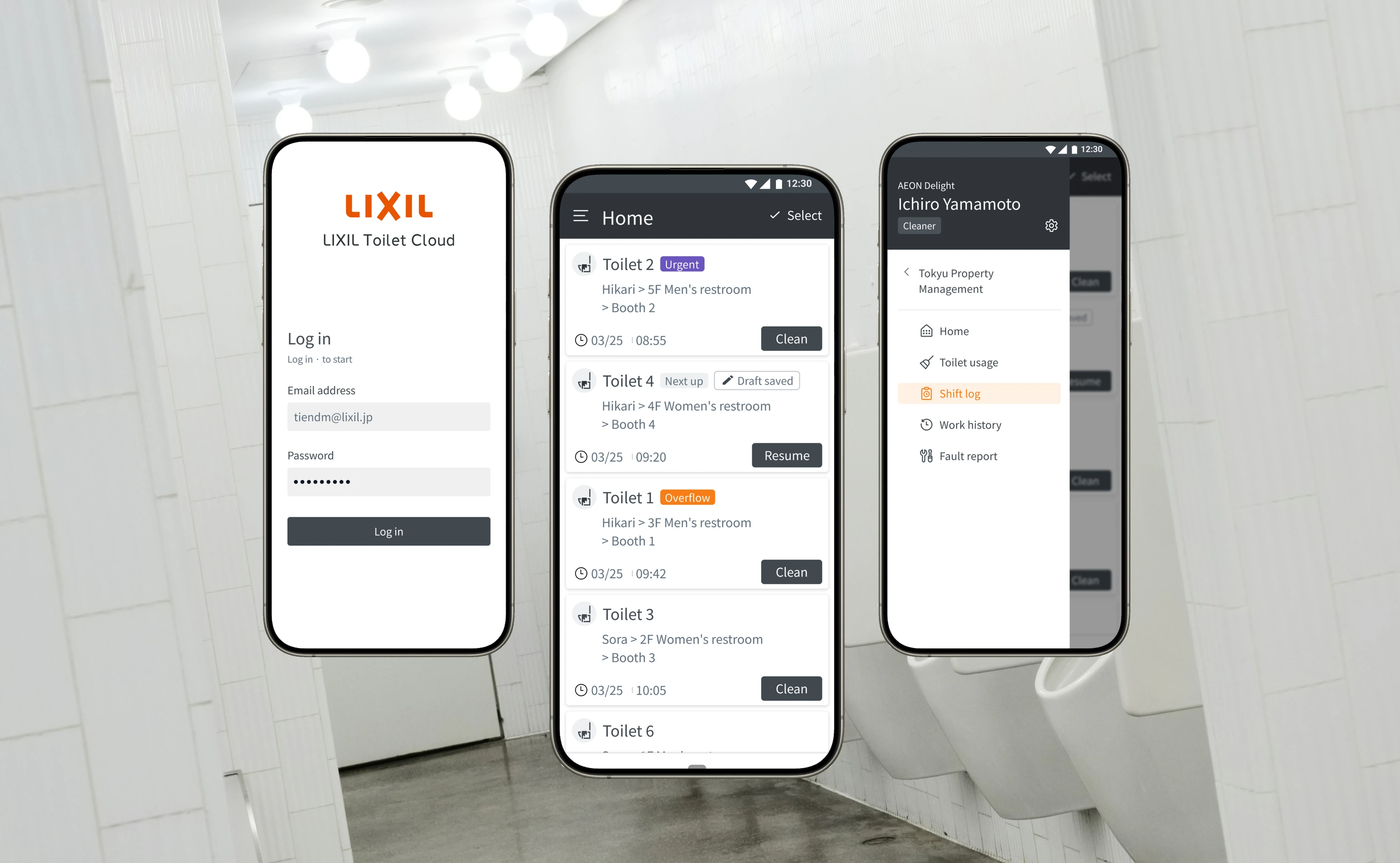
An action-first home
The previous mental model started with facility data. Lixil Toilet Cloud starts with work.
The Home screen separates the shift into three levels, so workers see priority before the underlying data.
Urgent
Possible blockage
May require immediate attention
Next recommended
5F Women's restroom
Suggested by usage patterns
Later
Soap refill
Routine, can safely wait
Design principle
Answer "What deserves my attention first?" before showing "What is happening in the facility?"
- Screen
- Decision
- Action
- Yes
- No
One visit, several tasks
When several jobs belong to the same restroom, Lixil Toilet Cloud combines them into a service visit. Location, worker and timestamp are captured once when the visit begins.
5F Men's restroom
3 tasks
- Toilet 02 · Cleaning
- Soap · Refill
- Urinal 01 · Inspection
Individual tasks still keep what's relevant to their type
Cleaning
- Condition after cleaning
Refill
- Resulting supply level
Inspection
- Observed condition or issue
Design rule
Batch by context. Report by task type.


 12:30
12:30Home

Toilet 2
UrgentHikari > 5F Men's restroom
> Booth 2
 03/2508:55
Toilet 4
Next upHikari > 4F Women's restroom
> Booth 4
03/2509:20Toilet 1
OverflowHikari > 3F Men's restroom
> Booth 1
03/2509:42Toilet 3
Sora > 2F Women's restroom
> Booth 3
03/2510:05Toilet 6
Sora > 1F Men's restroom
> Booth 6
03/2510:31Toilet 5
Hikari > 2F Women's restroom
> Booth 5
03/2511:10Step 1 / 5
Clean
Open the report for the first toilet.
Or try Select to clean several at once.
Exceptions become unmistakable
Routine work should feel quiet. An incident shouldn't. When Lixil Toilet Cloud detects something unusual, such as a possible blockage, the experience shifts from passive monitoring to guided action.
- Check the condition
- Confirm the issue
- Escalate to maintenance
Known information such as location, fixture, detection time and issue type automatically moves into the maintenance request. The worker contributes only what the sensor cannot know: what they actually saw.
Design principle
An exception should change the interface's volume, not its vocabulary.
08:55Alert
Log
Toilet 2
Check neededHikari > 5F Men's > Booth 2
08:55 detected · Kenta Sato
Possible blockage or overflow
A sensor detected a problem. Please check on site.
Where to check
Booth 2, 5F men's restroom. Check the toilet's water level and flow.
Assigned to
Kenta Sato · On shift
Step 1 / 6
Check on site
A sensor flags a possible blockage. It starts a check - it doesn't confirm a fault.
Handover happens naturally
Reporting should be a consequence of doing the work - not another task at the end of the shift.
The Shift Log automatically captures completed, postponed and unresolved work. When the shift ends, open items move to the next worker with their context and history attached. No rewriting, no separate end-of-day report, no dependence on memory.
Design principle
If the system watched the work happen, it shouldn't ask the worker to describe it again.
08:00Shift log
Let's start your shift
Check who's working and where.
Worker
Kenta Sato
Using this device

Location
Hikari
Your area · 3F–5F
2 items from the last shift
See postponed work and repairs in progress.
Step 1 / 5
Review handover and start
Check the worker and area, then review the handover
Tap the glowing button on the phone.
16:00Handover
Kenta Sato · Hikari
08:00 – 16:00 · 8 done
To hand over · 2

Soap refill
PostponedHikari > 3F Men's
Out of stock. Refill after the delivery.
15:30 · Kenta Sato

Toilet 2
In repairHikari > 5F Men's > Booth 2
Blocked. Check on the repair with maintenance.
In repair · M-204
Place, what was done and the next step fill in automatically.
Step 1 / 3
Choose recipient
Open work carries its history forward - choose who gets it.
Add a note puts a note on an item first - only if something is missing.
05UI & accessibility
Built for quick recognition
The interface is designed to be read for a few seconds at a time while standing and working.
Interaction
- 52–56px primary controls
- Large touch targets
- One-handed interaction
- No precision-dependent gestures
Status
- Never relies on colour alone
- Icon + label + colour communicate urgency and state
Language
- Familiar workplace language, not software terms
- “Finish cleaning”, not “Complete task”
Accessibility
Accessibility isn't a separate "senior mode". Readable typography, strong hierarchy, explicit status and forgiving touch targets are part of the default experience.
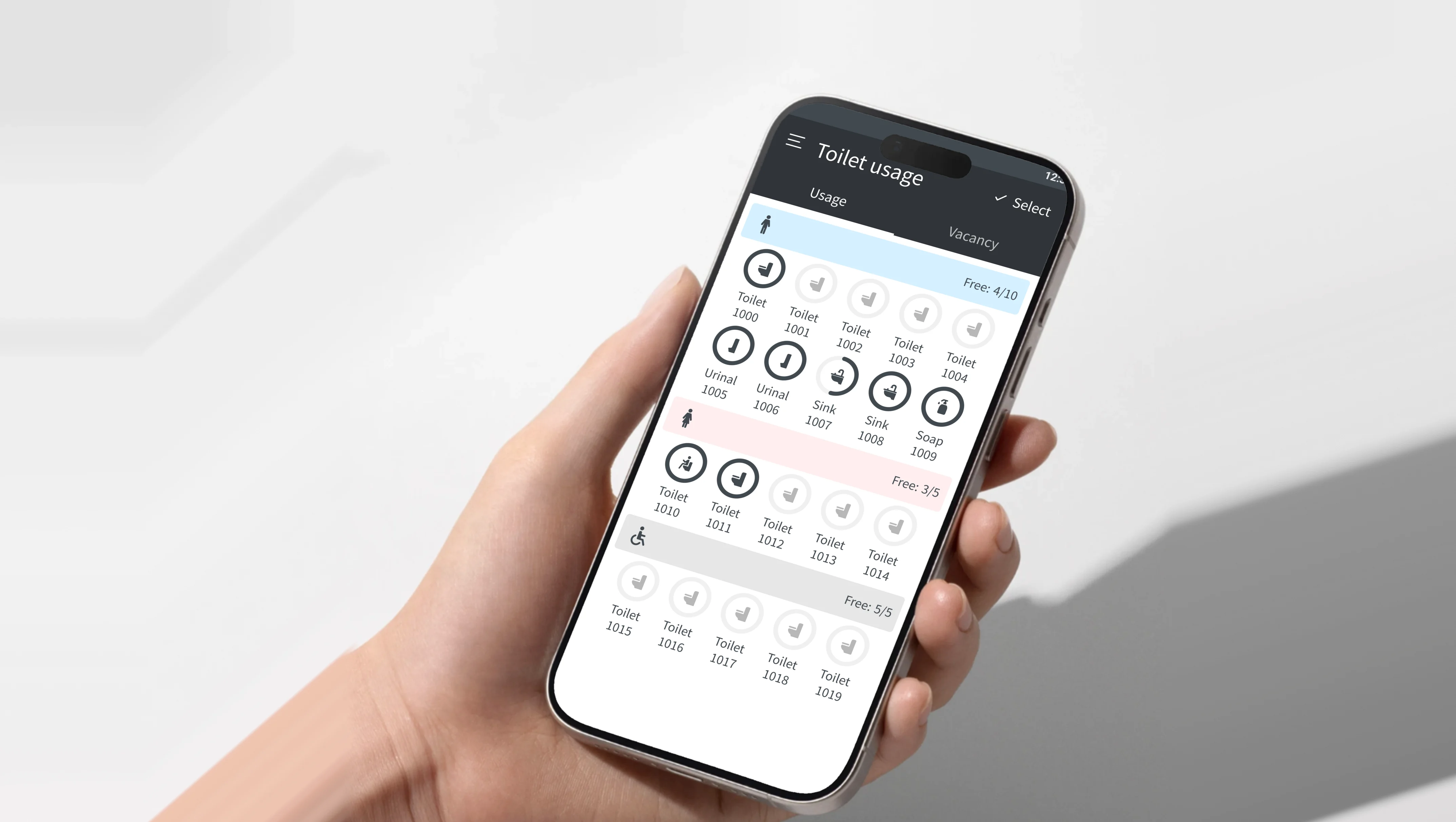
12:30Toilet usage
 Select
 3F - NorthFree:
 7/10
7/10 7/10
7/10 7/104F - North5F - South
Step 1 / 5
Men's
Each floor shows how many toilets are free right now.
Tap a group to see every fixture.
06What changed
From monitoring restroom data to helping people act on it
Before
Lixil Toilet Cloud
- 01
Before: Individual fixture records
Lixil Toilet Cloud: Prioritised operational work
- 02
Before: Manual multi-select
Lixil Toilet Cloud: Contextual service visits
- 03
Before: One completion pattern
Lixil Toilet Cloud: Task-specific reporting
- 04
Before: Sensor alerts
Lixil Toilet Cloud: Guided incident response
- 05
Before: Separate work records
Lixil Toilet Cloud: Shift log + handover
- 06
Before: System instructions
Lixil Toilet Cloud: Explainable recommendations
- 07
Before: Data-first interface
Lixil Toilet Cloud: Action-first interface
07Intended outcome
What I would validate
I don't have measured results to share, so I don't claim performance improvements. Instead, I would validate whether the new model creates:
Less unnecessary work
Fewer visits to restrooms that don't require attention.
Faster response
Clear separation between routine work and abnormal conditions.
Better continuity
More unresolved work successfully transferred between shifts.
Higher trust in automation
Workers understand why something is recommended and can override it when reality differs.
08Reflection
Two ideas I still design by
Design around real-world activity
Several database records can represent one real human activity. Understanding that difference can remove entire layers of unnecessary interaction.
Automation should support expertise
The strongest experience wasn't the one where software made every decision. It was the one where the system handled complexity quietly while leaving professional judgment with the person doing the work.
Takeaway
Good operational technology should disappear into the work.
現場に必要なのは、より多くの情報ではなく、次に何をすべきかがわかること。What the field needs isn't more information - it's knowing what to do next.
More work
- 04MyLab Design SystemEnterprise CRM Design SystemDesign System2024
- 05Lambda BiologicsA brand identity for an organoid biotech, grown from one continuous movement and published as the online guideline its teams build from.Branding2026
- 06XIANGQI - The Living BattlefieldSculptural Xiangqi BoardIndustrial Design2025