Project 02Enterprise Web
← All workMyLab CRM
Turning early customer signals into actionable opportunities.
MyLab is a B2B CRM for biotech business development teams. Its Leads module helps BD teams capture prospects, coordinate follow-ups and decide when interest is strong enough to become a real opportunity.
I led the redesign end to end - workflow, information architecture, interaction patterns and final UI.
- Role
- Senior product designer
- Year
- 2024
- Scope
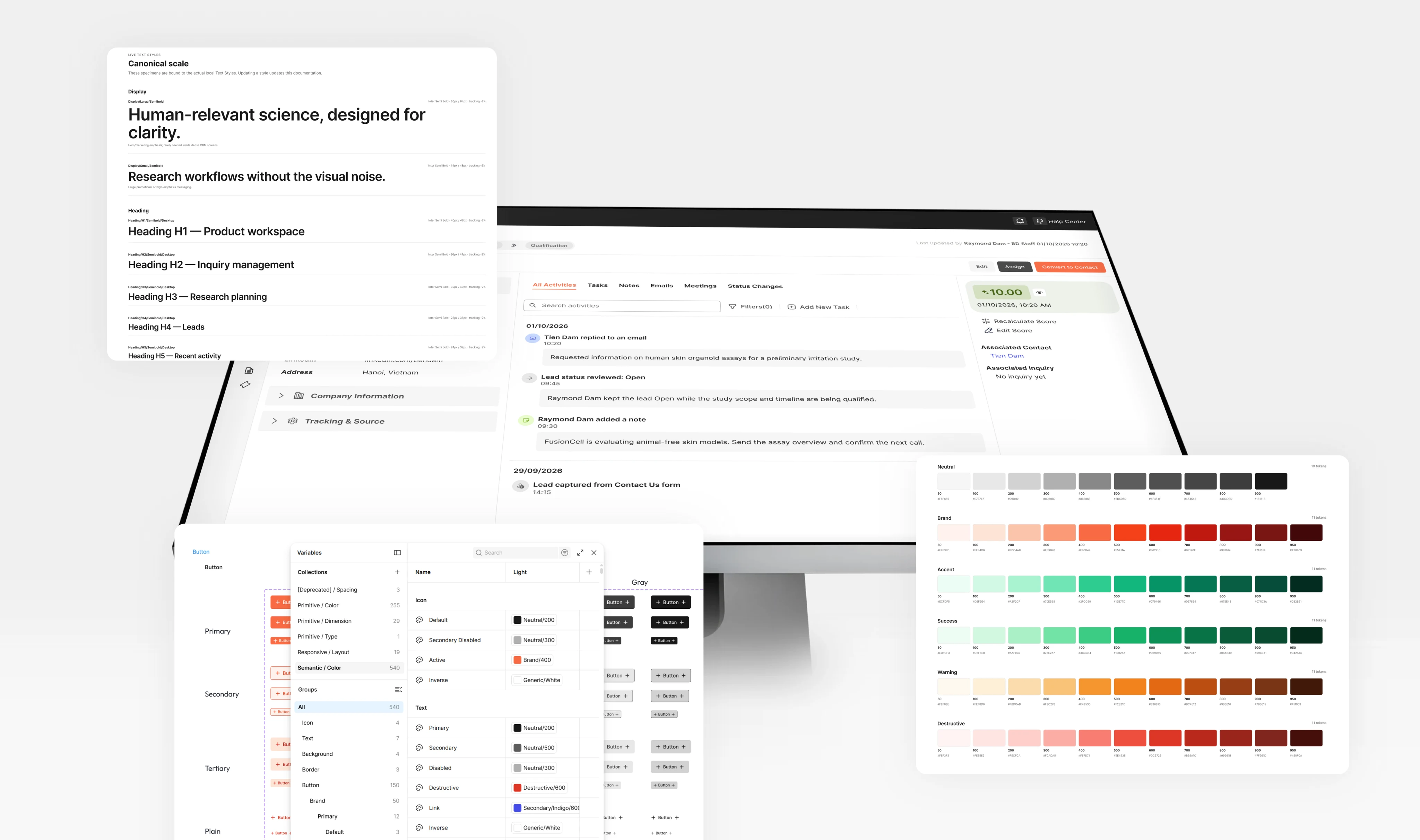
- UX research · Product strategy · Workflow design · Information architecture · UX/UI · Prototyping · Design system
- Platform
- B2B SaaS · Web CRM
01The challenge
A lead was more than a row in a table
Potential customers entered MyLab from many sources. Some arrived with detailed research needs and previous conversations. Others contained little more than a name and email address.
Where leads came from
- Website enquiries
- Conferences
- Referrals
- Campaigns
- Imported contact lists
However complete the record, BD needed to answer the same questions
- Who is this customer?
- Who owns the relationship?
- What has happened recently?
- Is this ready to become a contact?
The existing model was good at storing lead information. It was much weaker at helping people work with that information.
- 01
Hard to know what needed attention
With hundreds of leads in the pipeline, BD had to open individual records to understand whether a follow-up was overdue, ownership was missing or an opportunity was ready to progress.
- 02
Customer context was fragmented
Contact details, company information, notes, activities, tasks and communication existed separately. Users had to mentally reconstruct the relationship.
- 03
Qualification broke continuity
Changing a lead to Qualified didn't meaningfully turn it into a Contact. Information had to be found, copied or recreated.
The real problem
Lead management wasn't a data-management problem. It was a workflow for turning incomplete customer signals into qualified opportunities.
02The key reframe
A Lead is a workspace, not a database object
The first model looked simple. But the real workflow was much longer - a Lead needed to support the relationship while it was still taking shape.
- The first model
- CustomerLeadQualifiedContact4 steps
- The real workflow
- Capture customerUnderstand their contextCollect missing informationFollow upRecord activityAssess opportunityConvert7 steps
Instead of treating Leads as a database of prospects, I reframed it as a working environment for early-stage business development. Every lead needed three connected layers - together, the foundation of the module.
Customer context - who are they?
- Contact
- Company
- Industry
- Country
- Source
Opportunity context - why might this become business?
- Research interest
- Need
- Status
- Owner
- Qualification
Activity context - what is happening?
- Communication
- Tasks
- Meetings
- Notes
- Follow-ups
03UX strategy
Design around BD decisions
Instead of starting with screens, I mapped the decisions a BD user repeatedly needs to make.
Capture
Who is this?
Understand
What are they interested in?
Follow up
What has happened and what needs to happen next?
Qualify
Is this a real opportunity?
Convert
Should this become a Contact?
Goals
Turn Leads from a database into a working CRM workspace.
Make leads easy to scan
Priority and status should be legible without opening every record.
Make context easy to reconstruct
The detail view should carry both customer information and relationship history.
Make qualification continuous
Converting a lead to a contact should carry the relevant context with it.
North star
A BD user should open a Lead and immediately understand who the customer is, what has happened and what should happen next.
Principles
The decision map produced three UX priorities.
- 01
Make attention visible
Users shouldn't open every record just to discover where work is required.
- 02
Keep relationship context together
A Lead should tell a coherent customer story instead of exposing disconnected database entities.
- 03
Preserve context across the lifecycle
Moving forward should add structure to existing knowledge - not start the workflow again.
04Core experience
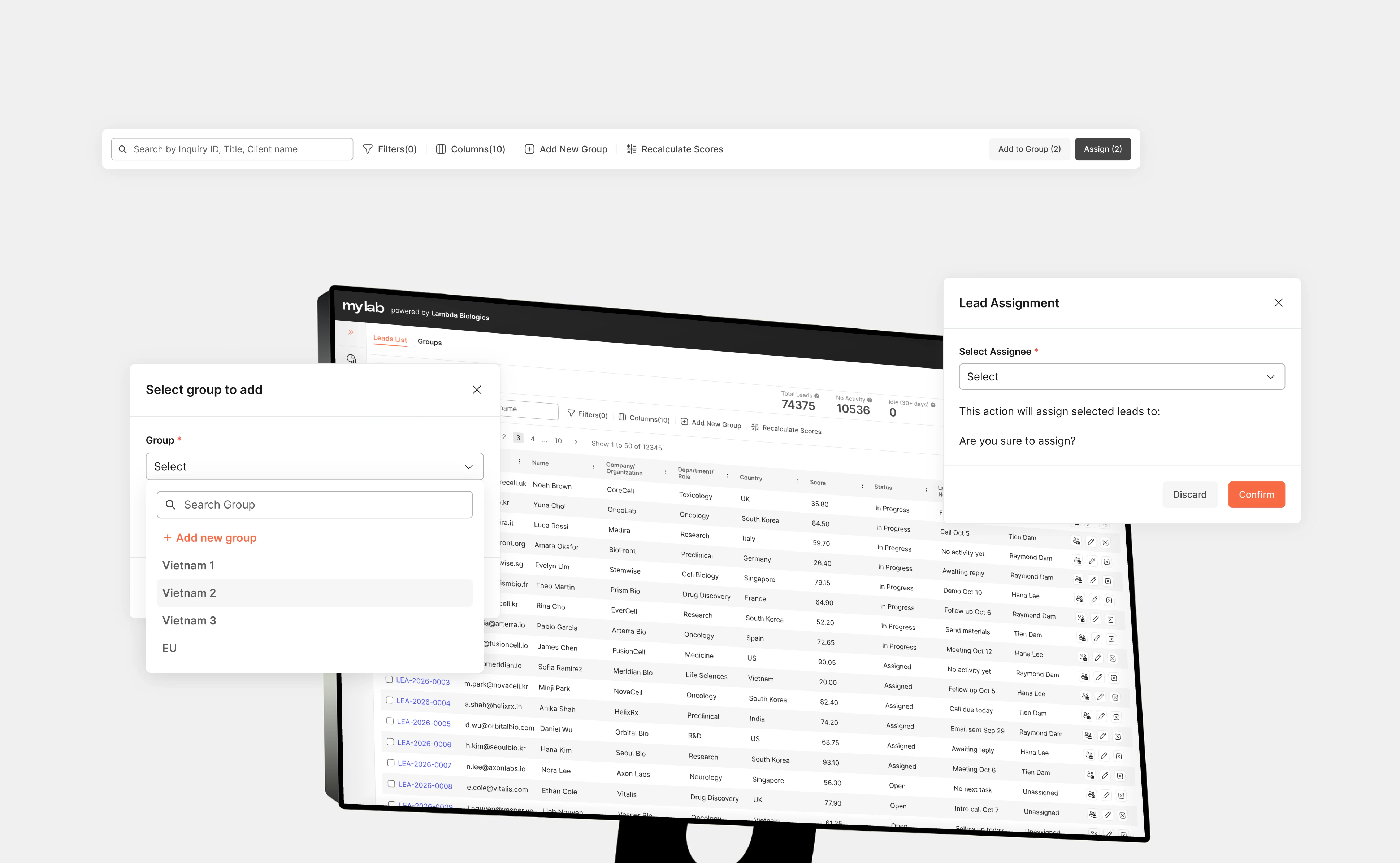
Turn the lead list into a decision surface
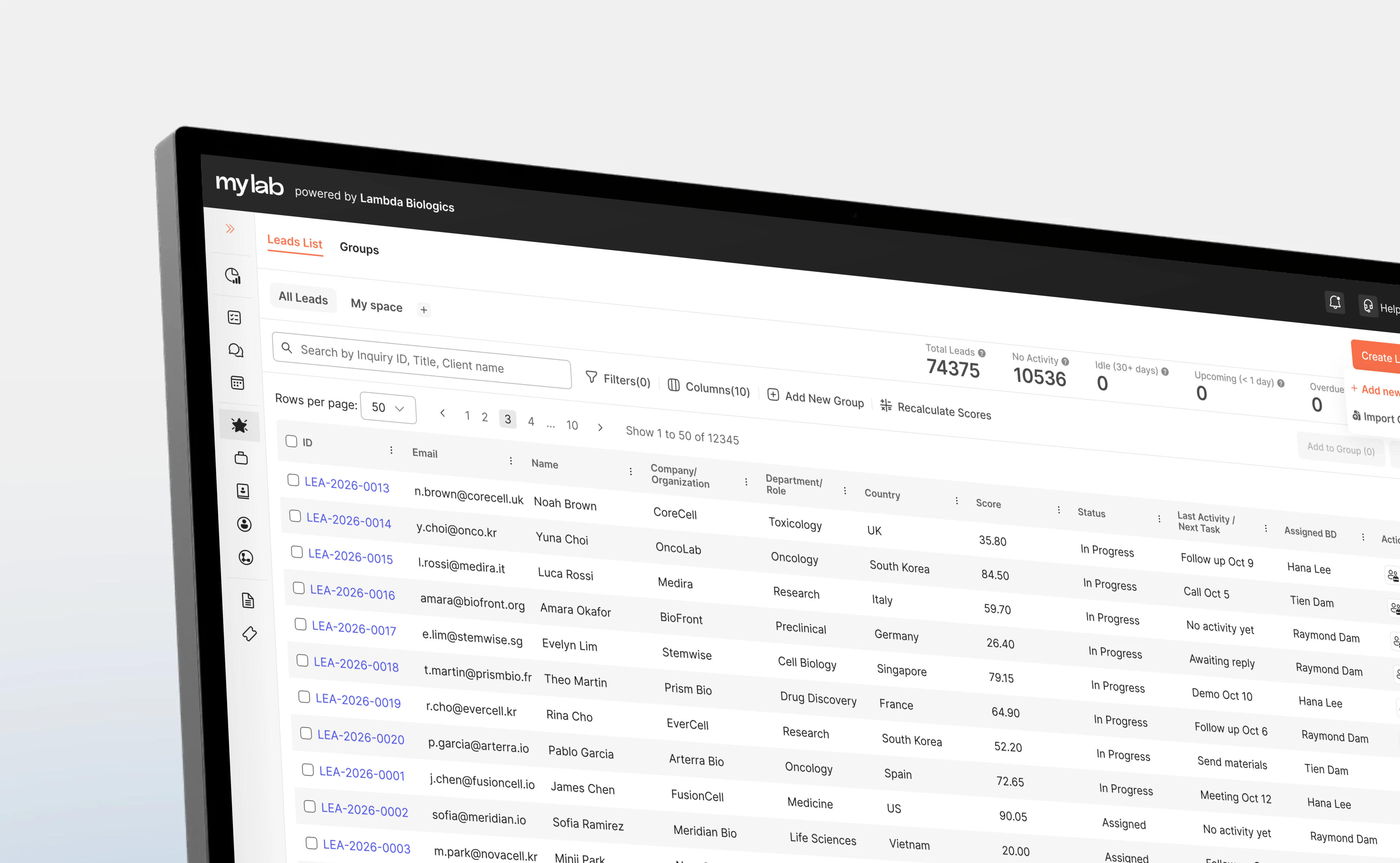
A conventional CRM table answers what leads exist. But BD's real question is: where should I work next?
So the listing was redesigned around triage. Instead of exposing every available field, each row carries only what a quick operational decision needs.
| Lead / Contact | Company | Source | Owner | Status | Last activity | Next action |
|---|---|---|---|---|---|---|
| John Kim | Acme Bio | Conference | Tien | Qualified | 2 days ago | Discovery call · Sep 25 |
| Priya Raman | Helix Labs | Website | Unassigned | New | 6 days ago | Assign owner |
| Marc Oliveira | Northpoint | Referral | Tien | Waiting | 12 days ago | Follow-up overdue |
| Sara Lund | Vireo Health | Campaign | Anh | Contacted | Yesterday | Send requirements |
Visible without opening the record
- Unassigned lead
- Follow-up overdue
- Waiting for response
- Recently contacted
- Qualified opportunity
Saved views reduce repeated work
- My Leads
- Unassigned
- Follow-up
- Qualified
- Screen
- Decision
- Action
- Yes
- No
- Before
- Find recordOpenReadInterpretDecide5 steps
- After
- ScanIdentifyAct3 steps
Design principle
Optimise the list for deciding where to work next - not for displaying every available field.
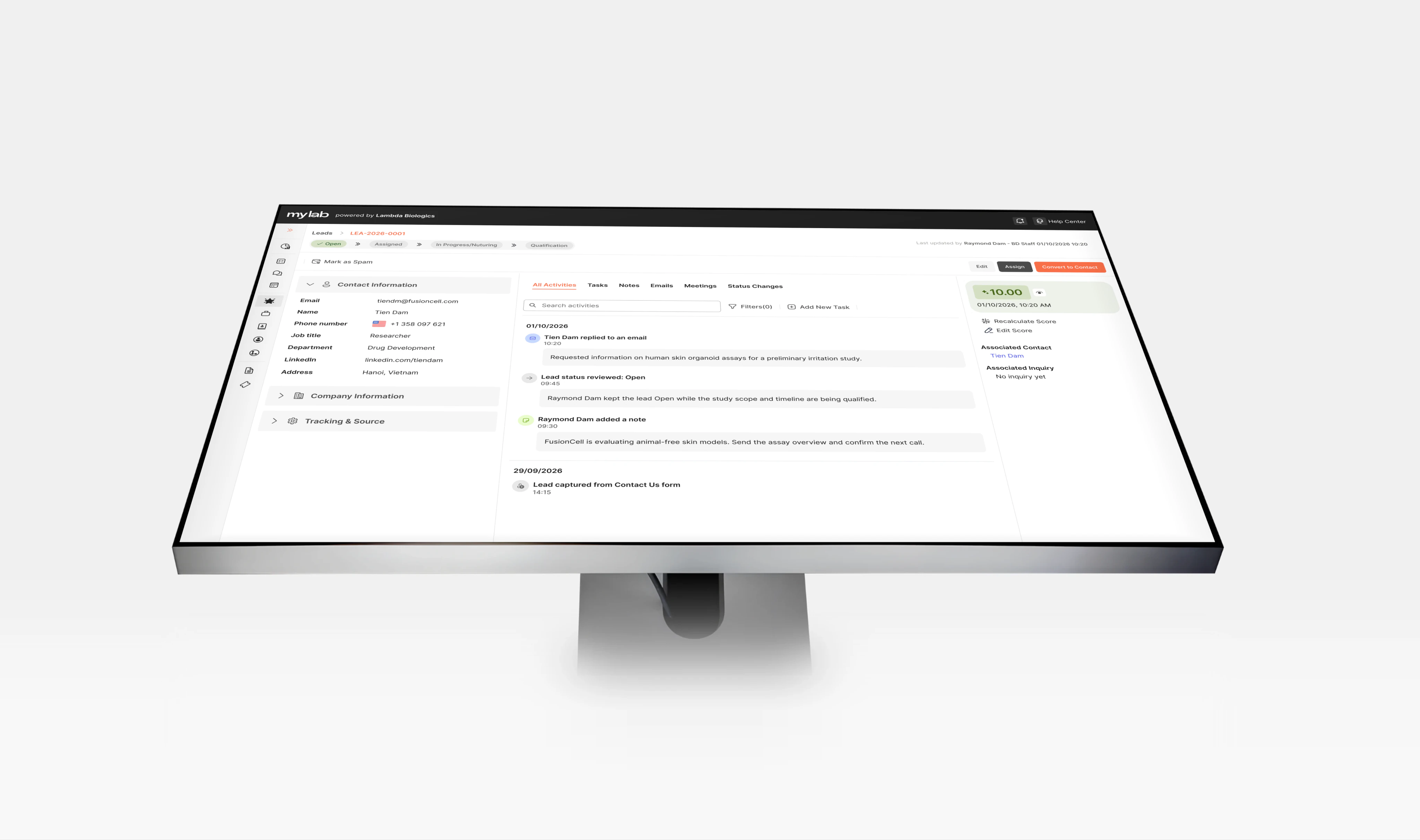
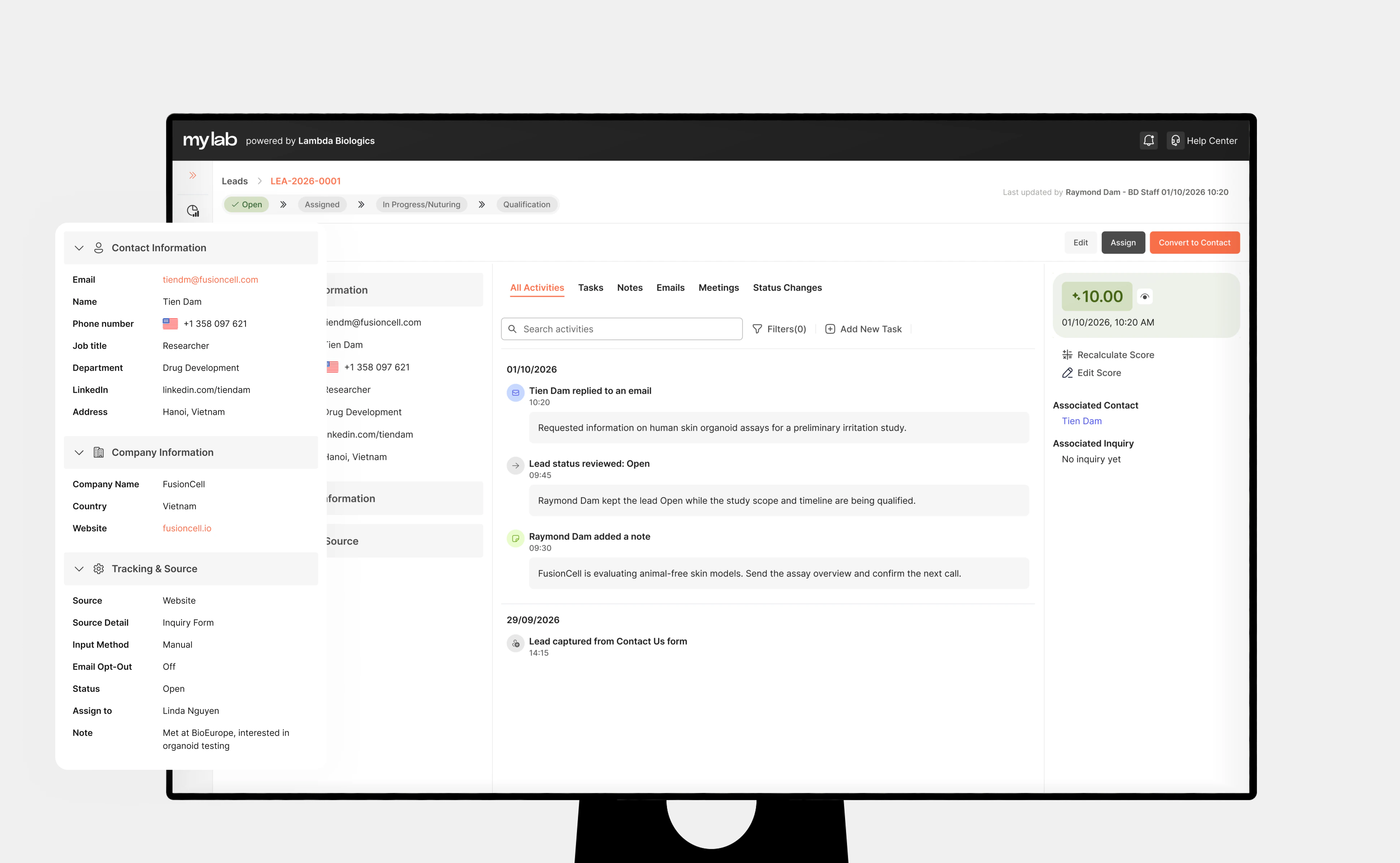
Turn the detail page into a relationship workspace
Opening a Lead shouldn't reveal another giant form. BD needs to understand a developing relationship, so the detail experience separates two questions. The header resolves identity and status once; the rest of the workspace can then focus on the work itself.
Who are they?
- Contact
- Company
- Source
- Research interest
- Ownership
What has happened?
- Communication
- Activity
- Tasks
- Meetings
- Notes
- Follow-ups
Acme Bio
John Kim · Senior Researcher
- Owner
- Tien
- Source
- Conference
- Next follow-up
- Sep 25
- Overview
- Activity
- Tasks
- Notes
Activity - a chronological relationship history
Status changed to Qualified
Sep 18 · Tien
Meeting scheduled - discovery call
Sep 16 · Tien
Email sent - intro and capability deck
Sep 12 · Tien
Note added - interested in assay development
Sep 11 · Anh
Lead created from conference list
Sep 09 · Import
Who?
Customer and company.
What happened?
Activity in chronological order.
What's next?
Ownership, tasks and follow-up.
A small information architecture decision
A field like Country could technically belong to several underlying entities. The easiest solution would have been exposing the database structure directly. Instead, fields were organised around the user's mental model - easier to understand, and later reusable across other CRM modules.
Contact
- Name
- Phone
- Job title
Company
- Company name
- Industry
- Country
- Website
Lead
- Source
- Status
- Owner
- Interest
Design principle
The UI should reflect how users understand the customer, not how the database stores them.
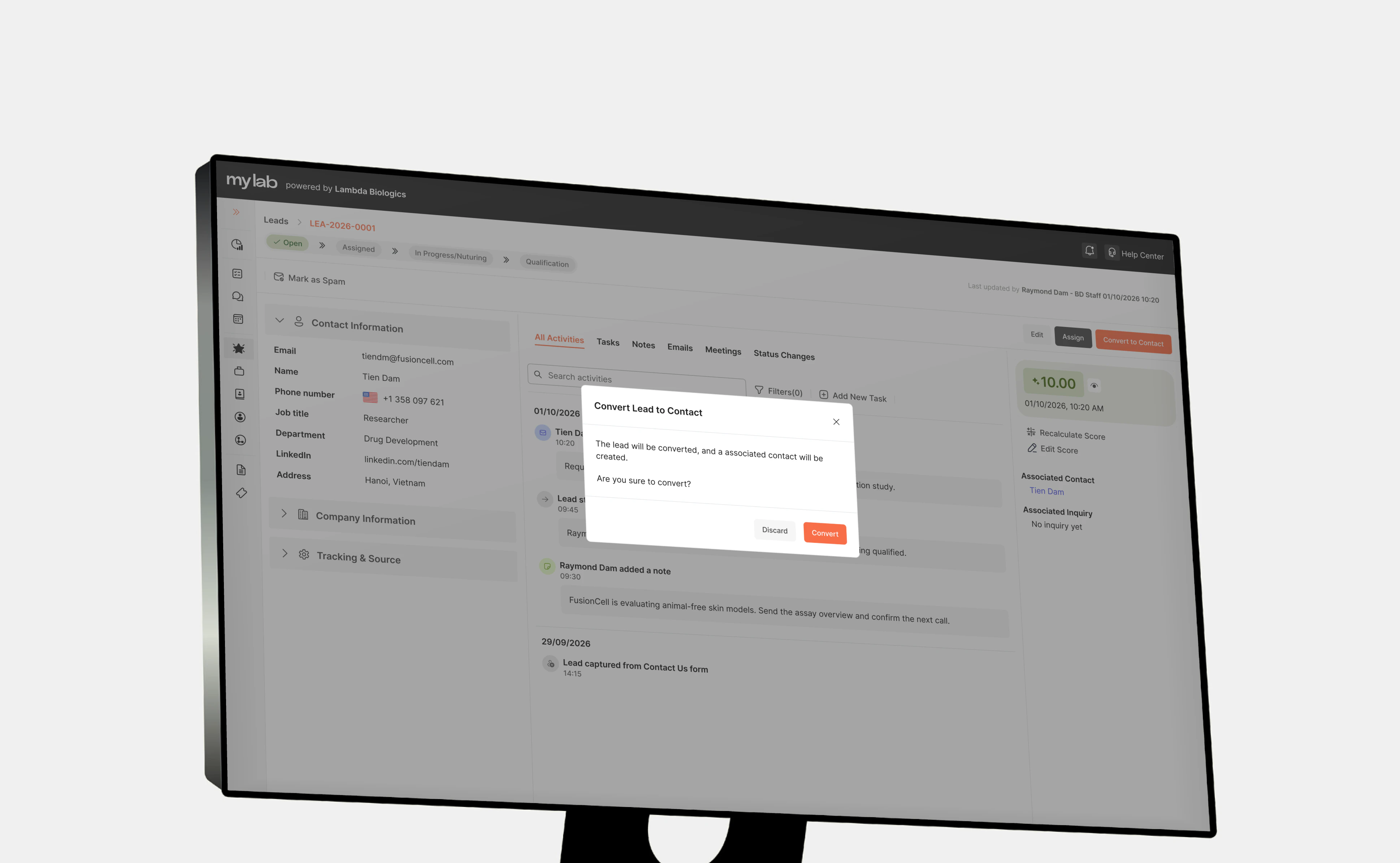
Make qualification a real transition
Originally, a lead's status changed to Qualified and a Contact was created separately. The status changed; the workflow didn't. I redesigned qualification as an explicit Lead → Contact conversion.
The Contact then becomes the long-term home for the relationship. Inquiries come later in the workflow - opened from the Contact once there's a concrete research request to scope.
Existing context carries forward
- Customer
- Company
- Research interest
- Activities
- Notes
- History
The user confirms only what the Contact now requires
- Contact details
- Company link
- Owner
- Relevant notes
- Missing information
- Before
- LeadCreate Contact manuallyFind customer againCopy informationLose relationship continuity5 steps
- After
- LeadQualifyConfirm informationConvert to ContactContinue working5 steps
Design principle
Moving forward in the business lifecycle should add structure - not discard context.
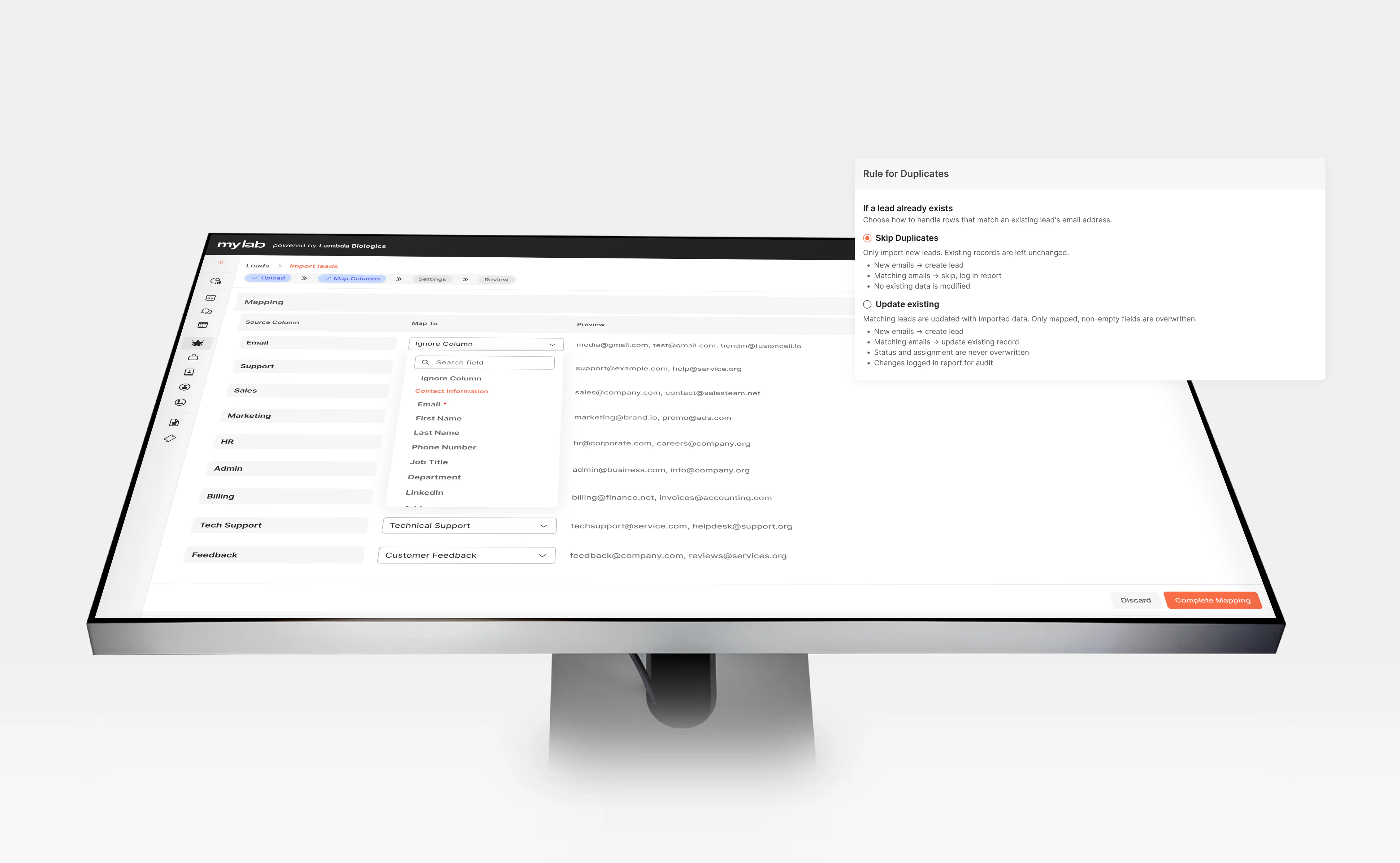
05Supporting real operations
CRM work doesn't happen one record at a time
The core Lead model also had to support the operational workflows around it.
Import Centre
BD teams can bring campaign or conference lists into the CRM without polluting the pipeline with malformed data.
- Upload
- Map fields
- Validate
- Review errors
- Import
Groups
Leads can be organised around real working contexts.
- Conference leads
- Partner referrals
- Q3 outreach
- Website leads
Edge states
- No leads
- No search results
- Import errors
- Missing customer information
- Unassigned leads
- Overdue follow-ups
- No activities
- Permission restrictions
Empty states don't simply report that nothing exists. They help explain what the system expects the user to do next.
06Designing for scale
Solving Leads also established patterns for the wider CRM
The goal wasn't to create a one-off Leads UI. Several structures developed here became reusable product patterns.
- Listing + filters
- Saved views
- Detail header
- Activity timeline
- Tasks
- Notes
- Ownership
- Status
- Create / edit forms
- Empty states
- Lead
- Contact
- Inquiry
- Project
Design principle
Solve the recurring product structure once, then let modules inherit it.
07Outcome
From lead records to an actionable CRM workflow
Instead of treating Leads as stored customer data, the experience helps BD teams actively move relationships forward.
- Capture
- Understand
- Organise
- Follow up
- Qualify
- Convert
Find the right lead
Searchable and filterable views make priorities easier to identify.
Understand the customer
Contact, company, opportunity and relationship history come together in one working context.
Know what happens next
Ownership, tasks and follow-ups move out of individual memory and into the product.
Progress opportunities
Qualification becomes a continuous conversion from Lead to Contact rather than a restart - ready for an Inquiry when a real request arrives.
08Reflection
The hardest problem wasn't designing the table
Leads looked like a straightforward listing-and-detail feature. The real work was structural - what a Lead owns, and what should survive its conversion to a Contact.
Takeaway
In complex SaaS products, designing the relationships between information and workflows matters more than designing the screens that display them.
More work